Microsoft: "why IIS is unsafe by-design"
Example isn't another way to teach, it is the only way to teach.
The (special) case of Microsoft IIS
After it left the user-mode Winsock API (WS2_32.DLL) to run in a kernel driver called the 'Windows HTTP Stack' (HTTP.SYS), IIS 6.0 got an instant 3x boost.
But the Microsoft Platform SDK makes it clear that there is a price to pay:
"User-mode vs. Kernel-mode Drivers"
"In Windows NT 4.0, drivers were moved into kernel mode to improve performance. However, when a kernel-mode driver fails, it can crash an entire system, whereas the failure of a user-mode driver causes only the current process to crash. Windows Server 2003 can still run kernel-mode drivers, although this is not recommended for the stability reasons mentioned previously."
(Microsoft TechNet, March 2003)
Trying to avoid this, Windows Server 2008 desperately tries to... reboot when it detects kernel-patching.
Just curious, I benchmarked* IIS 7 and the newly born G-WAN 1.0 (portable) code. Encouraged by this success, I also benchmarked G-WAN's C servlets vs. C#. And this time, as ASP.Net is running in user-mode, IIS+ASP.Net share half G-WAN's handicap.
Static contents: ab -k -c 100 -t 1 http://10.10.2.6/1000.html
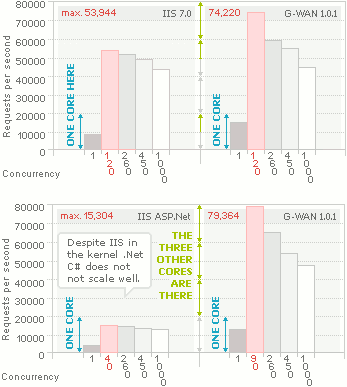
Dynamic contents: IIS: http://10.10.2.6/hello.aspx, G-WAN: http://10.10.2.6/?hello
Despite the (growing exponentially with concurrency) user-mode overhead G-WAN 1.0 manages to outdo IIS' kernel-mode performances!
A simple IIS ASP.Net 'Hello World' is 5x slower than G-WAN servlets. And G-WAN C scripts even beat IIS' static pages.
Plus, G-WAN (100 KB with C servlets included) is 2,000+ thousand times smaller than Microsoft IIS 7 (501 MB will all modules – the bare server core takes 228 MB).
Note: after ASP.Net is enabled on Windows Vista/2008, the TCP/IP stack is 10% slower, penalizing all other applications (G-WAN included). This is due to the way Microsoft interfaced ASP.Net to the HTTP.SYS kernel driver.
Want to see how G-WAN does on Solaris, Mac OS X or BSD? Help us do it!
(*) ab and servers were run on the same host, rebooted for each tests serie; tunable options: no log files, accept max = 1,024, connection timeout = 5, keepalive max = 100,000.